SMPTE 2110 Video Monitor
SMPTE 2110 Video Monitor: Professional Solutions for IP Broadcast
As the industry shifts toward professional media over IP, the need for a robust SMPTE 2110 video monitor setup has become paramount. Integrating high-end broadcast systems requires a system that can bridge the gap between traditional SDI and modern ethernet networks while maintaining real time performance for live production.
2110 Video QoS & QoE Monitoring Solution
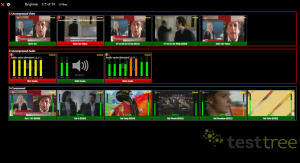
High-Performance SMPTE Video Integration and Control
To effectively monitor an IP-based media stream, engineers often rely on a Blackmagic converter or AJA hardware to translate SMPTE ST 2110 standards for local view. Whether you are using a Blackmagic Design suite, a high-performance Decklink card, or specialized converters, the goal is to ensure that video audio synchronization remains flawless across a single or multi-link infrastructure.
Advanced Control and Monitoring Features:
-
SFP Connectivity: Most broadcast systems utilize an HDMI SFP or an optical fiber module to connect and ingest SMPTE data directly into the monitor system.
-
NMOS Support: Full NMOS integration offers quick discovery and control of all streams across the media network.
-
Power and Portability: A compact mini design ensures that the converter fits into any production rack, providing a reliable video output with minimal power consumption.
-
Input Versatility: Modern converters feature multiple inputs, including SDI, HDMI, and even XLR for balanced audio input.
Utilizing Blackmagic and AJA Converters in Production Mode
In a live production environment, the Blackmagic mini range and AJA devices are staples. A Blackmagic SDI to IP converter allows you to take a standard channel SDI signal and wrap it into SMPTE 2110 for ethernet distribution across multi-platform networks.
By switching the device to production mode, operators gain quick access to color calibration and monitoring tools. For example, a mini converter can take the IP media output and provide a mini HDMI or SDI feed to a local monitor. This SDI SMPTE bridge is essential for legacy gear to coexist with newer optical fiber based workflows.
2110 Video QoS & QoE Monitoring Solution
Technical Specifications:
StreamProbe: The Software-Based SMPTE 2110 Video Monitor
While hardware like the Blackmagic mini provides the physical output, a software monitoring system like StreamProbe acts as the ultimate SMPTE video watchdog. It allows you to inspect the signal health and view data streams without needing a dedicated hardware converter for every single channel.
By combining Blackmagic design hardware for physical monitoring with StreamProbe for real time monitoring analysis, you create a robust infrastructure that supports ultra high-definition content. This hybrid mode offers the best of both worlds: hardware-based video output and software-based data monitoring across multi-vendor systems.
Choosing the Right SFP and Fiber SDI Setup
When configuring your smpte 2110 video monitor, the choice of SFP is crucial. Whether you require a bidirect SFP for compact setups or a single-mode fiber SDI link, the hardware must be rugged enough for live production.
Integrating a Blackmagic converter with optical fiber ensures that your video audio streams are transmitted with perfect color accuracy. These networks support ultra resolutions and connect seamlessly to modern ethernet systems, ensuring that every video input meets strict professional media standards.
FAQ: SMPTE 2110 Monitor and Converters
How do I connect an XLR audio source to my 2110 stream? Many professional media converters include XLR inputs to embed balanced audio directly into the SMPTE 2110-30 data stream.
Does this system support multi-mode optical fiber? Yes, depending on the SFP module used, these systems support both single and multi-mode optical fiber for a quick and reliable connect.
What are the benefits of NMOS control? NMOS offers a standard way for a quick connect between your video input and the monitor output, simplifying the management of complex media networks.